Contact us
Before you email
Check the FAQ below — it covers the most common questions we hear.
Frequently asked questions
No questions match your search. Email us at support@boxnearby.com and we'll help.
Printing shipping labels
How do I print a shipping label with a label printer?
When downloading your shipping label, select the label printer format. Set the printer's paper size to match the label format and the label stock before printing. The standard 4 × 6-inch size is 101.6 × 152.4 mm; 100 × 150 mm is a similar, but not identical, size.
If the correct size is not listed, open the printer's Properties or Printing Preferences and look for a custom paper size option. In Windows, you may also be able to create a custom form under Control Panel → Devices and Printers → Print server properties → Forms.
For 4 × 6-inch stock, name the form "4x6 Label," set the width to 4 inches and the height to 6 inches, and use zero margins if supported by your printer. Save the form and select it when printing. An incorrect paper size can crop the label or cause an extra blank label to feed.
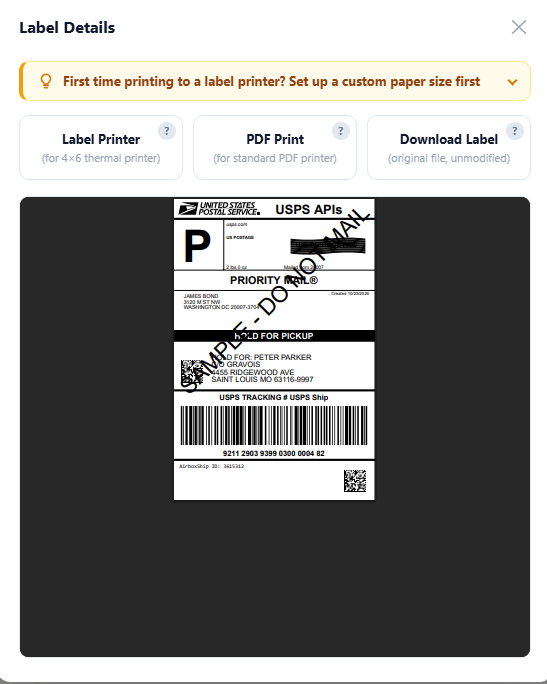
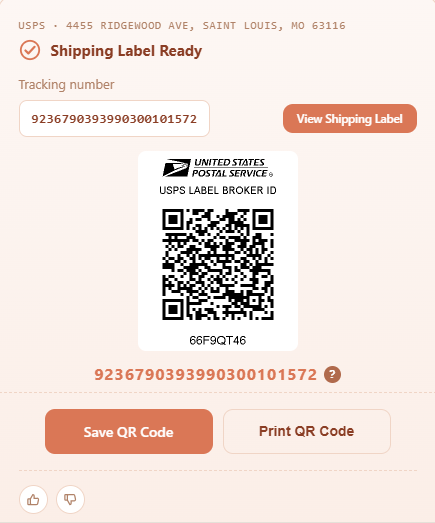
How do I use a USPS Label Broker QR code?
- After you purchase a shipping label through AirboxShip, your USPS Label Broker QR code will appear on the confirmation screen, as shown below.
- Bring your QR code and a sealed, ready-to-ship package to a participating USPS Post Office.
- At the counter, show the QR code on your phone. A USPS associate will scan it and print your label.
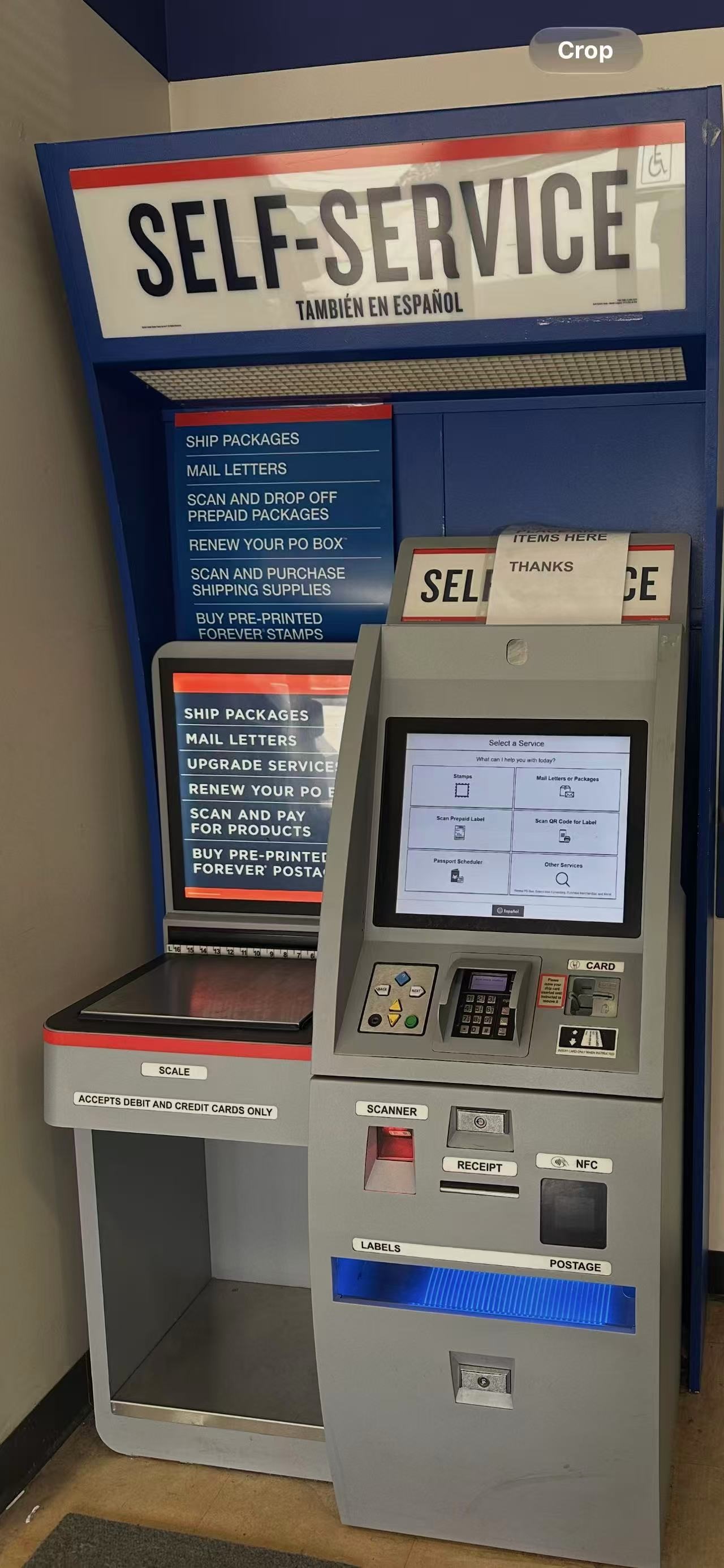
- Or at a self-service kiosk that supports Label Broker, touch the screen and select the Scan QR Code for Label option, scan your QR code, and follow the instructions.
- Attach the label to your package before dropping it off. Label printing is free; postage must already be paid.
Pickup points and smart lockers
How does USPS Hold for Pickup work?
USPS holds Hold for Pickup packages at the designated Post Office for 15 days for Priority Mail and USPS Ground Advantage, or 5 days for Priority Mail Express. USPS returns unclaimed packages to the sender after the pickup window. faq.usps.com
Select Hold for Pickup when you buy the shipping label. There's no extra fee for the service. Bring an acceptable primary ID when you pick up the package.
How can I pick up a package from USPS smart locker?
If your package has been delivered to a USPS smart locker, after delivery you will receive an email from USPS with a smart locker Pickup Code or you will see a new message will be sent to Airboxship account’s message box.
Shipping charges and carrier adjustments
What charges am I responsible for?
You are responsible for applicable service fees, shipping charges, taxes, and carrier adjustments or surcharges. These charges may be billed automatically to your designated payment method.
Are the displayed shipping rates final?
Displayed rates are estimates based on the information you provide. Final charges may change following carrier audits, package measurements, address validation, or applicable surcharges.
Why might I receive an additional charge after purchasing a label?
Carriers may assess additional charges based on your package's actual weight, dimensions, packaging, address corrections, or other applicable surcharges. BoxNearby may charge your payment method or deduct these amounts from your account balance.
How can I help avoid carrier adjustments?
Enter accurate package weight, dimensions, and address information when creating your shipment. Use packaging that complies with the selected carrier's requirements, and review applicable restrictions and surcharges.
How do I dispute a carrier adjustment?
Submit a written dispute to support@boxnearby.com within 30 calendar days after the adjustment is billed. Include supporting evidence, such as drop-off receipts showing the package's weight or dimensions, photos of package measurements, and a copy of the shipping label.
Does submitting a dispute guarantee a refund?
No. BoxNearby reviews your documentation and submits a dispute or appeal to the carrier on your behalf. The carrier decides whether to reverse the charge. Under our terms, adjustments that are not disputed within 30 calendar days are considered accepted and non-refundable.
Refunds and insurance
Can I request a refund for an unused shipping label?
Yes. You may request a refund for an unused shipping label within 48 hours of purchase. The platform fee is non-refundable. USPS, UPS, and FedEx shipments must not have been scanned by the carrier or included on a carrier scan form. If the shipment was insured, its insurance fee is refunded with the label.
Where will my shipping label refund be sent?
Credit card payments are refunded to the same credit card and wallet payments to the wallet, less the non-refundable platform fee.
Eligible refunds typically require 15 to 20 days of processing. Your request is held for a processing period before the label is cancelled with the carrier and your refund is issued, so please do not use the label in the meantime: if it has been scanned by then, the refund is declined.
Can I get my wallet balance back?
Yes. In Settings → Wallet, choose Refund balance to return unspent funds to the card or bank account you added them with. The refund is sent right away, and card refunds usually take 5 to 10 business days to appear on your statement.
The processing fee you paid when adding funds is not refunded.
How long do I have to request a wallet refund?
A wallet refund can be requested only within 180 days of the date the payment was captured, which is the day the funds were added to your wallet. Funds added more than 180 days ago can no longer be returned to your card or bank account.
Are other fees and purchases refundable?
Unless otherwise stated in writing, other fees and purchases are non-refundable. Eligible shipping label refunds are subject to the specific label refund conditions.
Can I purchase shipping insurance?
Yes, when it is offered with your rate options in the web chat. Choose Yes, protect my shipment and enter the value of your shipment. The price (a percentage of that value, with a minimum) and the maximum value you can insure are shown before you pay. Insurance protects against damage, loss, or theft, regardless of carrier, service, or destination, and appears on your receipt.
To report a problem with an insured shipment, email support@boxnearby.com with your tracking number. If insurance cannot be added after your label is created, the insurance fee is refunded to you and your label is not affected.
Shipment requirements and support
What items are prohibited?
Our terms prohibit items including explosives, certain flammable or combustible materials, oxidizers, corrosives, compressed gases, poisons, irritants, controlled substances, illegal drug paraphernalia, certain magnetized materials, and dry ice. This list is not exhaustive. Review both BoxNearby's restrictions and the selected carrier's rules before shipping.
Who is responsible for complying with carrier rules?
You are responsible for ensuring that your shipment complies with applicable laws and the carrier's terms, packaging requirements, tariffs, and shipping restrictions. You are also responsible for resulting penalties, fees, or losses if your shipment violates those requirements.
What should I do if a package is delayed, lost, or damaged?
Contact support@boxnearby.com for assistance, and direct shipment issues to the designated carrier, such as USPS, UPS, or FedEx. Under our terms, BoxNearby does not accept liability for carrier performance or for packages that were not tendered to a carrier.
How will I receive pickup and delivery notifications?
We primarily send notifications by email, SMS/text message, and mobile app push notification. Your mobile carrier's standard messaging and data charges may apply.
Accounts and service terms
Is there a free trial of the Basic plan?
Yes. New members get the first 3 months of Basic free. You add a card when you start, nothing is charged until the free months end, and after that Basic is billed monthly at the price shown on the Plans page. You can cancel anytime. You can also keep using AirboxShip without a plan.
How does the referral program work?
Referring friends is a benefit of the Basic plan. Every Basic member has a referral link and a flyer with a QR code under Settings → Refer a friend. A friend counts as a referral once they create an account through your link and confirm their email address. When you reach the referral goal shown there you get 1 year of Basic free, and the people you refer get 3 months of Basic free when they start Basic.
Can my account be suspended or terminated?
Yes. BoxNearby reserves the right to suspend, restrict, or terminate accounts or access to services. Shipping prohibited items, repeatedly providing inaccurate or fraudulent shipment data, or violating carrier rules may result in immediate suspension or permanent termination.
What happens to my account balance if my account is suspended?
BoxNearby may freeze or reserve funds to cover pending carrier adjustments, fines, chargebacks, or other outstanding obligations. Funds may be held for up to 180 days, or longer if required by a carrier audit or legal proceeding. Any remaining funds are released after outstanding liabilities are settled.
How do I close my account?
Contact support@boxnearby.com to request account closure. Closing your account does not remove your responsibility for outstanding charges, carrier adjustments, penalties, or other obligations.
Do third-party terms also apply?
Yes. If you use connected platforms or carriers, including Shopify, WooCommerce, BigCommerce, USPS, UPS, or FedEx, their respective terms, shipping rules, and privacy policies also apply.
Is uninterrupted service guaranteed?
No. Services are provided on an "as is" and "as available" basis. We do not guarantee uninterrupted or error-free service. Services may also be affected by events outside our reasonable control.
Can the terms or prices change?
Yes. BoxNearby may update its terms, change prices, introduce fees, or modify, suspend, or discontinue services. Continued use of the services signifies acceptance of the then-current terms.
Still need help?
Email us at support@boxnearby.com and we'll get back to you as soon as we can.
Back to shipping →